Laser Projector Throw Distance: How Big Is the Picture?
Laser projector throw distance: how big is a LaserCube's picture at 2, 5, 10 or 20 m, what the Expander adds, and how far back to put it for your wall.
Before you buy a laser projector, you want to know one thing: how big will the picture be on my wall, from where I can put it?
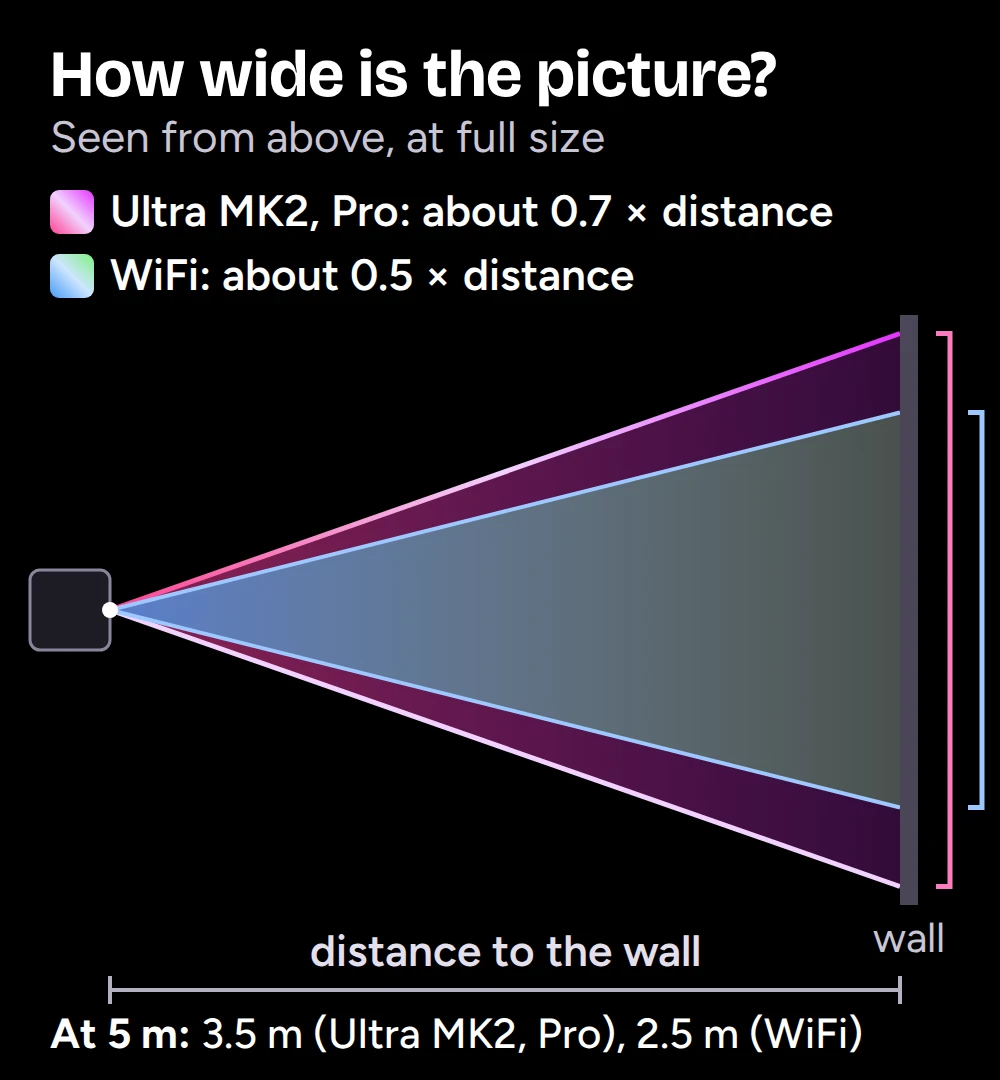
In short: at full size, a LaserCube Ultra MK2 or Pro draws a square picture about 0.7 times as wide as the distance to the wall. A LaserCube WiFi draws one about half as wide as the distance. So at 5 m (16 ft) you get about 3.5 m (11.5 ft) or 2.5 m (8.2 ft). Here are the sizes, how to work out your own space, and what to do when you can't move further back.
This is about laser show projectors, which draw with a beam. For laser video projectors, see What is a laser projector?
Throw distance and throw ratio, in plain words
The throw distance is how far the projector stands from the surface it projects on. Video projectors are rated by their throw ratio: the distance divided by the picture width. A ratio of 2:1 means 2 m back for every 1 m of picture.
A laser show projector works differently. It doesn't fill a screen with pixels: its scanners move a laser beam to draw lines. Its picture still grows with the distance, and what sets the size is how far the scanners can swing the beam: the maximum scan angle. On the Ultra MK2 and Pro it is over 37°, on the WiFi over 26°.
Put as a throw ratio, that is about 1.4:1 for the Ultra MK2 and Pro and about 2:1 for the WiFi.
How big is the picture at each distance?
These are full-size pictures. At full size the picture is square, so the height is the same as the width. On the LaserCube Ultra MK2 and Pro:
- At 2 m (6.6 ft): about 1.4 × 1.4 m (4.6 × 4.6 ft)
- At 5 m (16 ft): about 3.5 × 3.5 m (11.5 × 11.5 ft)
- At 10 m (33 ft): about 7 × 7 m (23 × 23 ft)
- At 20 m (66 ft): about 14 × 14 m (46 × 46 ft)
On a LaserCube WiFi the picture is about half as wide as the distance: about 1 × 1 m (3.3 × 3.3 ft) at 2 m (6.6 ft), 2.5 × 2.5 m (8.2 × 8.2 ft) at 5 m (16 ft), 5 × 5 m (16 × 16 ft) at 10 m (33 ft) and 10 × 10 m (33 × 33 ft) at 20 m (66 ft).
The Ultra MK2 and Pro numbers, with an Expander column, are also in the manual's Picture Size and Throw Distance table.
Work out your own wall
Two quick calculations cover almost every plan:
- Picture width = distance × 0.7 on an Ultra MK2 or Pro (× 0.5 on a WiFi).
- Distance you need = the width you want ÷ 0.7 on an Ultra MK2 or Pro (÷ 0.5, so twice the width, on a WiFi).
Two examples:
- A wall 4 m (13 ft) wide above a stage or a bar. With the cube mounted high, so every beam stays at least 3 m (10 ft) above the floor wherever people may be, put an Ultra MK2 or Pro about 5.7 m (19 ft) from the wall. At full size the picture is 4 m high too; if the wall is lower than that, make the picture less tall (next section).
- A house front 15 m (49 ft) away. At full size an Ultra MK2 or Pro covers about 10.5 m (34 ft). If the house is smaller, turn the picture down so every beam ends on the wall, never above the roof. Mask the windows and balcony doors with a safety zone, and make sure nobody is on the balconies, in front of the house or anywhere in the beams' path.
There's no fixed maximum distance. The farther away, the bigger the picture, and the dimmer it looks, because the same light is spread over more wall. For graphics on far-away buildings, see building projection mapping and how far laser light travels.
Smaller, or wide and low
Full size is the most the cube can draw. You can always make the picture smaller from the same spot:
- In LaserOS: Settings, Projector Setup, Image (in the phone app: the gear at the top right, then Image Setup). Turn on the Square test pattern to see the whole area, then use Zoom X and Zoom Y (down to a tenth of full size). With Lock Zoom X-Y off, you can set the width and the height separately, so a wide, low picture fits a banner above a stage or a long wall. See Image Settings in LaserOS.
- On the Ultra MK2 and Pro themselves: X-size and Y-size in the cube's Image Setup (Settings, Projection). They apply in the cube's own modes, such as shows from its SD card; in LaserOS control mode, LaserOS's settings apply.
A smaller picture also draws detailed content more cleanly, and it's easier on the scanners than running them at their full size. If you want detailed graphics big, move the cube further back rather than turning it up to full size close by.
When you can't move further back: the Expander
In a small room or a narrow venue, the Expander makes the picture about 3 times wider and higher (9 times the area) from the same spot. An Ultra MK2 or Pro 2 m (6.6 ft) from the wall then draws about 4.2 × 4.2 m (14 × 14 ft) instead of 1.4 × 1.4 m.
- Like a fisheye lens, it bends the edges inwards at full size. For straight edges, use about 70 to 80% of the full size.
- Every line gets about three times as thick and a little dimmer, so it suits beams and big, simple shapes better than detailed graphics.
- The same Expander fits every current LaserCube: WiFi, Pro and Ultra MK2. It takes the place of the lens holder, so it can't be combined with another lens.
- Switch the laser off before you fit or remove it. Fitting it moves the picture, so set the size, position and any safety zone again afterwards, then check where every beam ends: with the Expander fitted the beam block can't be used, and every beam must still stay at least 3 m (10 ft) above the floor wherever people may be. See Expander in the manual.
Which model for a big picture?
For a big picture that stays bright, choose an Ultra MK2: its picture is about 0.7 times the distance wide against the WiFi's 0.5, and the 10W has the most light. The Pro has the same scanners and picture size in a smaller, lighter body. It isn't sold in the USA yet.
A word on safety
LaserCube is a professional show laser, not a toy: never aim it at people's eyes, at audiences or at aircraft, and never at anything flammable. Wherever people may be, keep every beam at least 3 m (10 ft) above the floor, and use the beam block so nothing reaches them (see Hardware Installation). With the Expander or another lens fitted, the beam block can't be used, so check where every beam ends. More in our safety tips.
Frequently asked questions
Q01What is the throw ratio of a LaserCube?
About 1.4:1 for the Ultra MK2 and Pro (the picture is about 0.7 times as wide as the distance) and about 2:1 for the WiFi (about half as wide as the distance). With the Expander, an Ultra MK2 or Pro is about 0.5:1.
Q02How far away does a LaserCube need to be for a 3 m picture?
About 4.3 m (14 ft) for a 3 m (10 ft) picture from an Ultra MK2 or Pro, and about 6 m (20 ft) from a WiFi. With the Expander on an Ultra MK2 or Pro, a little over 1.4 m (4.7 ft), or about 2 m (6.6 ft) for straight edges.
Q03Is the picture always square?
At full size, yes, though with the Expander fitted its edges bend inwards, like a fisheye lens. In LaserOS you can set the width and the height separately (Zoom X and Zoom Y with Lock Zoom X-Y off), so a wide, low picture works too.
Q04Is there a maximum projection distance?
No fixed one: the farther away, the bigger and dimmer the picture. Beams in the air have been seen at up to about 500 m (1,640 ft) in our tests. That's a top figure, not what every setup reaches; more laser power, darkness and a little haze make beams much more visible. For graphics on a building, beyond about 400 m (1,310 ft) it only works on a very large surface.
Q05Can I make the picture smaller without moving the cube?
Yes: with Zoom X and Y in LaserOS (down to a tenth of full size), or, in the cube's own modes, with X-size and Y-size in the Ultra MK2 and Pro's Image Setup menu.
See it for yourself
LaserCube is a portable, battery-powered RGB laser projector, and its show software, LaserOS, is free.
Explore the LaserCube lineup