How Far Can Laser Light Travel? Range & Specs Guide
Wondering how far laser light can travel? Compare throw distances by wattage class, learn how haze affects beams, and pick the right setup.
Planning an event light show brings up a fundamental question: how far can laser light travel before a beam softens or loses visual impact? Mobile performers and lighting designers often set up a projector expecting an intense aerial beam to slice across an entire festival ground, only to find the visible reach drops off after fifty feet.
That sudden loss in range can complicate gear planning and venue mapping. Theoretical physics tells us that laser light moves infinitely through the vacuum of space, yet real-world event production on Earth operates under physical atmospheric limits.
Understanding how optical wattage, beam divergence, and air quality interact makes it easy to choose the right projector for your venue footprint. Compact, battery-powered systems like the LaserCube bridge the gap between theoretical range and real-world performance, keeping projections sharp across any space.
Understand why laser light fades in Earth's atmosphere
Laser light moves in a coherent, focused path, but air molecules, natural beam spread, and ambient lighting continuously reduce its visible reach. While photons encounter zero resistance in deep space, our atmosphere is filled with nitrogen, oxygen, dust, and water vapor that actively absorb and scatter optical energy.
For a deeper look at photon behavior, explore our guide explaining the nature of a laser beam.
Every time a photon collides with an airborne gas molecule, it deflects away from the core projection axis. Over long throw distances, this cumulative scattering gradually softens the beam and dilutes its perceived intensity.
Beam divergence measures this expansion rate in milliradians (mrad). Because every beam widens as it travels forward, its optical energy spreads across an increasingly larger surface area, directly lowering visual brightness.
Ambient lighting compounds the problem by washing out projections. High-output stage washes, architectural floodlights, and nearby streetlamps reduce contrast on walls and in the air, meaning you need significantly higher diode power to keep cues crisp in bright rooms.
Evaluate the core specs that dictate visible throw range
Diode output power and optical lens choices directly determine whether a projected graphic or aerial beam cuts through a space or vanishes into thin air. Laser systems balance several hardware specifications to preserve that energy across open rooms.
Optical power is rated in milliwatts or watts; unlike a video projector, a laser projector has no lumens rating. Higher optical wattage maintains the tight photon density needed to keep complex graphics, company logos, and monograms readable from the opposite side of an arena.
Color wavelengths also play a major role in perceived reach because of human biology. The human eye detects green light around 520 nanometers far more efficiently than red or blue light at identical wattages. Because of this natural photopic sensitivity, green-dominant cues appear dramatically brighter and punch through darkness over noticeably longer distances.
Your physical environment also dictates how different visual effects appear:
- Surface projections: Vector text, animations, and logos land on physical walls, scrims, or building facades, making them clearly visible in clean air with no haze.
- Aerial effects: Mid-air tunnels, liquid sky sheets, and sweeping fans require suspended airborne particles to bounce photons back toward the viewer’s eyes. Performers unsure about venue requirements can read our guide on whether fog is needed for a laser show. Pairing a projector with a compact tool like the Nano Fogger introduces the fine mist needed to reveal these beams mid-air without filling the room with heavy smoke.
- Optical accessories: Using standard focused optics preserves a narrow beam profile for maximum throw distance. Adding specialized accessories like an Expander lens triples the optical scan angle to make the total projection area nine times larger, intentionally trading long-range throw to flood a tight room with wide graphics.
Match laser wattage class to your venue throw distance
Selecting the right laser projector depends on balancing your venue’s physical dimensions with its ambient lighting levels. Choosing the correct hardware tier ensures your projections stay crisp across the entire floor without overpowering an intimate setting.
Compact and low-power class (1.2W)
Compact 1.2W systems (1,200 mW) suit smaller spaces. These agile units fit comfortably into house parties, art galleries, and intimate lounges:
- Scanner performance: AT-25K galvo scanners running at 25,000 points per second easily produce fluid aerial sheets and clean vector shapes. To understand mirror speeds, review our guide on scanner speed and KPPS ratings.
- Hardware example: With the battery-powered LaserCube 1.2W WiFi, mobile performers get two to three hours of wire-free runtime to project sharp monograms and aerial fans without hunting for wall outlets.
Mid-power class (2.5W)
Mid-power 2.5W systems (2,500 mW) deliver more than double the brightness of entry-level hardware. This extra output suits bigger rooms and patios:
- Key advantages: Richer color saturation and clean white balance across medium-sized dance floors, patio events, and club spaces.
- Hardware example: The LaserCube 2.5W WiFi provides a portable upgrade for mobile DJs who need strong visibility across larger rooms while keeping a lightweight, backpack-friendly footprint.
Professional and high-power class (10W)
High-power 10W projectors deliver an intense 10,000 mW, making them the standard choice for large commercial venues, music festivals, and outdoor building projection mapping:
- Range: there is no fixed maximum: on a building at night, graphics work up to about 400 meters (about 1,300 feet); beyond that, the widening beam blurs them unless the surface is huge.
- Scanner performance: Upgraded AT-40S galvos operating at 35,000 points per second project detailed SVG vector artwork and fine typography with less distortion or flicker.
- Hardware example: The LaserCube 10W Ultra MK2 incorporates native DMX, Art-Net, ILDA, and an onboard battery system designed for professional stage workflows and long-distance throws. Learn more about console integration in our breakdown of what a DMX laser is.
Apply field techniques to maximize visible beam reach
Applying smart setup habits in the field allows you to get maximum visibility from your hardware while keeping every beam away from your audience. A few thoughtful adjustments during soundcheck ensure your cues remain striking throughout the night:
- Position haze upwind: Place your fogger or hazer slightly upwind so gentle breezes and natural room airflow carry an even, distributed mist across the entire projection corridor, as detailed in our guide to smoke laser effects.
- Prioritize green-dominant palettes: Select green or cyan color profiles in your software cues when projecting graphics, logos, or aerials across maximum venue distances.
- Keep standard optics attached for long throws: Rely on standard factory optics to maintain tight beam convergence over long distances, reserving wide-angle expanders for tight indoor spaces.
- Maintain audience beam clearance: Keep every beam at least 3 meters (10 feet) above any floor where people may be, with a 3-meter buffer on all sides between the beams and the areas where people are. For outdoor events, terminate beams against solid backdrops or building facades, never in the open sky: lasers must never hit aircraft or enter airspace.
- Configure digital Safety Zones: Open the LaserOS app and configure Safety Zones (Attenuation Zones) to keep beams off camera sensors, screens or objects. When inverted to create a red keep-out zone, the software reduces the laser power inside that area according to the attenuation setting (100% blanks the beams fully). A zone never protects people: nobody should be in front of the laser, with or without one.
Wrapping up
How far laser light travels depends on diode output wattage, optical divergence, lens selection, and atmospheric haze density. Matching your projector’s power class to your venue dimensions ensures your surface graphics and aerial effects remain sharp and vivid from the front row to the back wall.
Portable, battery-powered projectors like the LaserCube make it simple to deliver long-range projections without wrestling with heavy generators or power cables.
Ready to see the full LaserCube lineup? Visit the LaserCube product page to compare models, bundles, and accessories, and find the right setup for your next show.
Frequently Asked Questions (FAQs)
Q01How far can a laser beam be seen on a building at night?
On a solid wall or building facade at night, a high-power projector can display graphics from up to about 400 meters (about 1,300 feet); beyond that, the widening beam blurs them unless the surface is huge. Clear surface projections do not rely on fog because the beam lands directly on solid matter.
Q02Does beam color affect how far a laser looks visible?
Yes. The human eye has peak sensitivity to green wavelengths near 520 nanometers. A green laser appears brighter than a blue or red laser of equal wattage, making green-heavy cues easier to see at long distances.
Q03Why do laser beams look bright up close but disappear mid-air further out?
Laser light stays invisible in clean air until it bounces off floating matter. As distance grows, natural beam divergence spreads photons across a wider area. Without an even layer of haze, the scattered light becomes too faint for human eyes to detect.
Q04How does an Expander lens affect laser projection distance?
An Expander lens triples the scan angle to make the image area nine times larger from a short distance. This wide optical spread disperses the light energy over a larger field, which reduces throw range compared to a standard focused lens.
See it for yourself
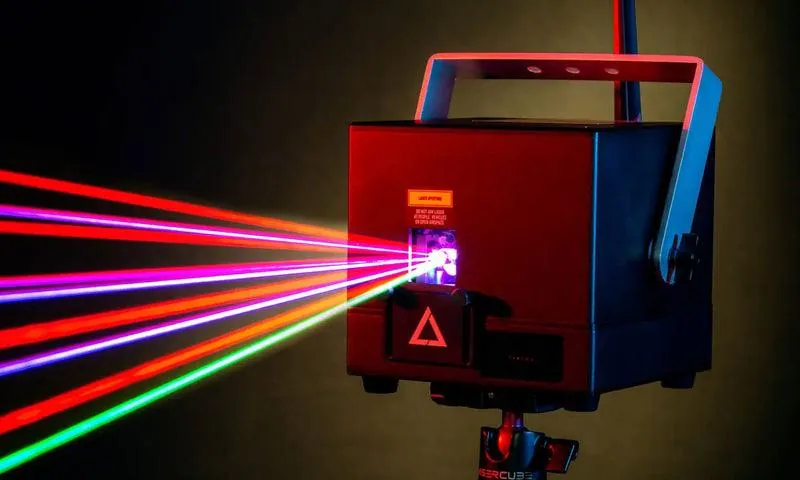
LaserCube is a portable, battery-powered RGB laser projector, and its show software, LaserOS, is free.
Explore the LaserCube lineup